

Sergey Shkundaleu @archit3ct@social.ssbx.dev
- WebSite
- https://sergey.iontec.co/
- GitHub
- https://github.com/sergshk
Admin
Experienced technology entrepreneur on the quest for ethics and privacy. Follow #punkprivacy tag to get regular privacy tips. You can also follow @ethiork account to get information about progress of Ethiork project that enables people to own their data and protect their privacy.
Joined Nov 2020
Sergey Shkundaleu
boosted

New breach: Under Armour was the victim of a ransomware attack in November. Customer data was published to a hacking forum this week and includes 72M email addresses, along with other personal information. 76% were already in @haveibeenpwned. Read more: https://haveibeenpwned.com/Breach/UnderArmour
Sergey Shkundaleu
boosted
Katie Paxton-Fear: The Importance of Content Creation in Cybersecurity Careers https://thehackermaker.com/katie-paxton-fear-the-importance-of-content-creation-in-cybersecurity-careers/
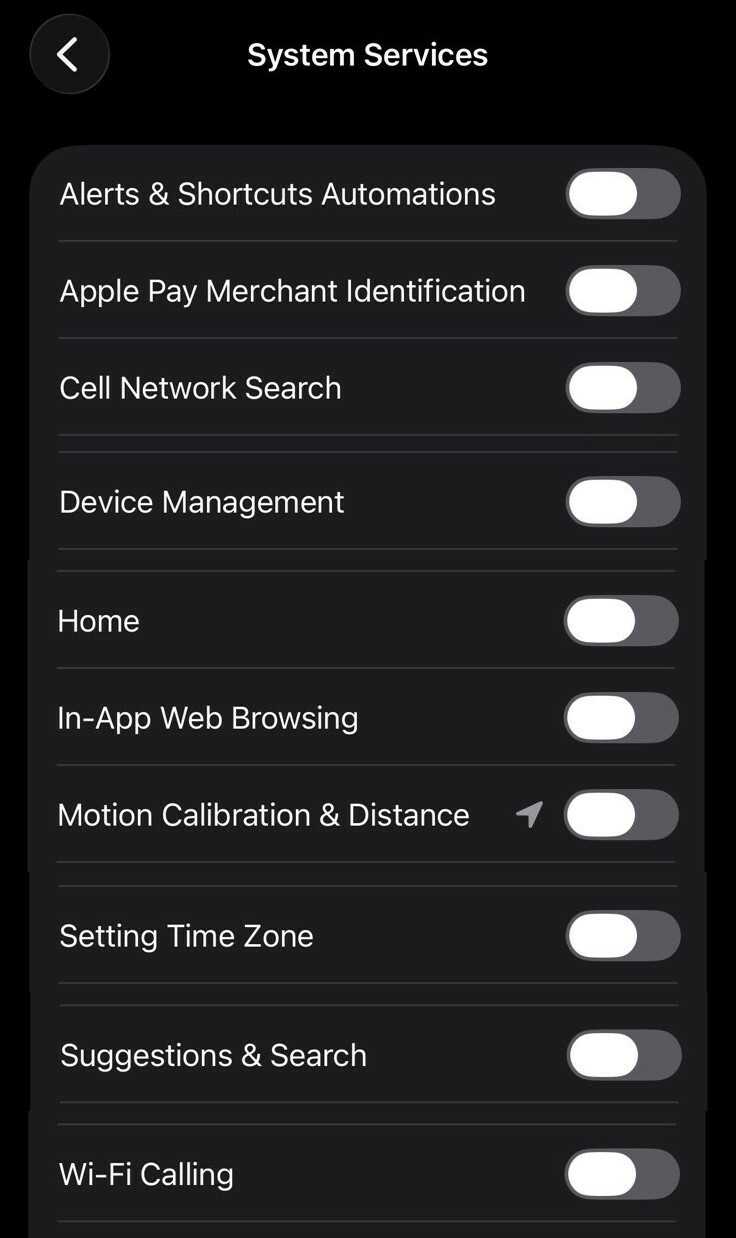
Next set is quite complex, explanation won't fit into a single post. So here is list of items I'd recommend to disable for personal iPhone. Go to Settings-> Privacy & Security-> Location Services scroll down through all the apps, at the bottom you'll see "System Services", click on it. Go through all options and adjust as you see fit, recommendation on the image. While you are there turn on "Status Bar Icon" to see when location used. #iphoneprivacy #punkprivacy
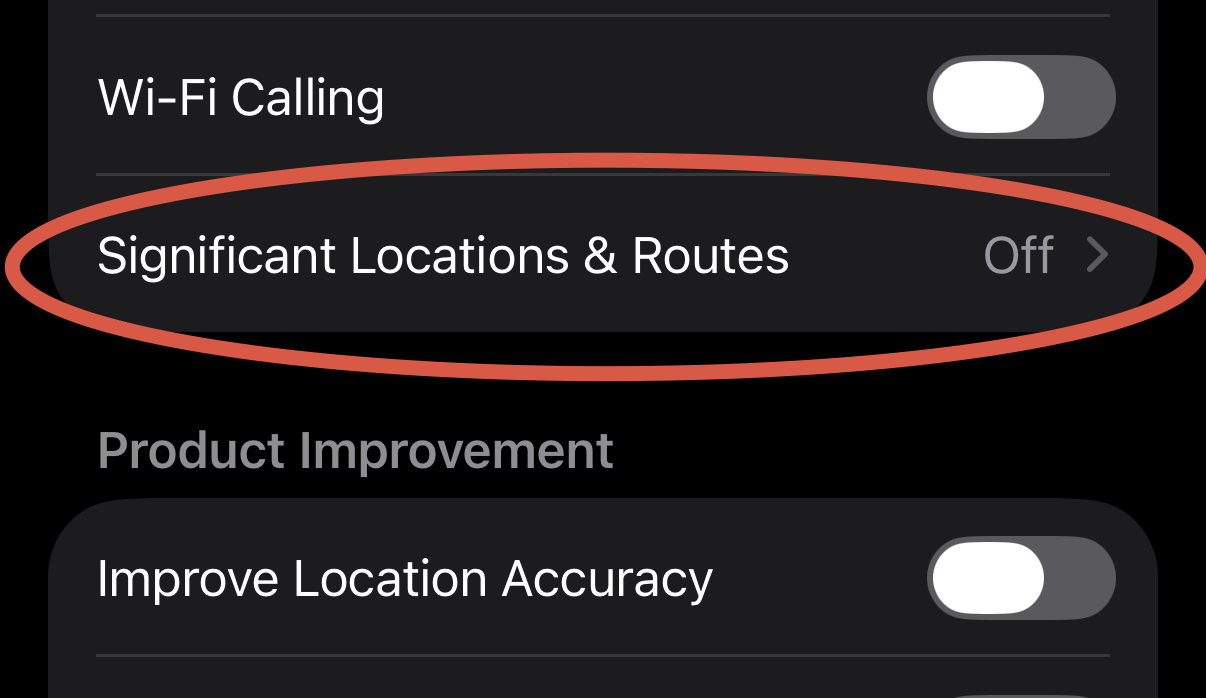
This setting might be a bit controversial, but I'll still recommend turning it off. Go to Settings-> Privacy & Security-> Location Services scroll down through all the apps, at the bottom you'll see "System Services", click on it. Scroll down to Significant Location & Routes and click on it. Then disable it and clear history. Description states that it's end to end encrypted and can't be read by Apple, but I'll still recommend turning it off anyway. #iphoneprivacy #punkprivacy
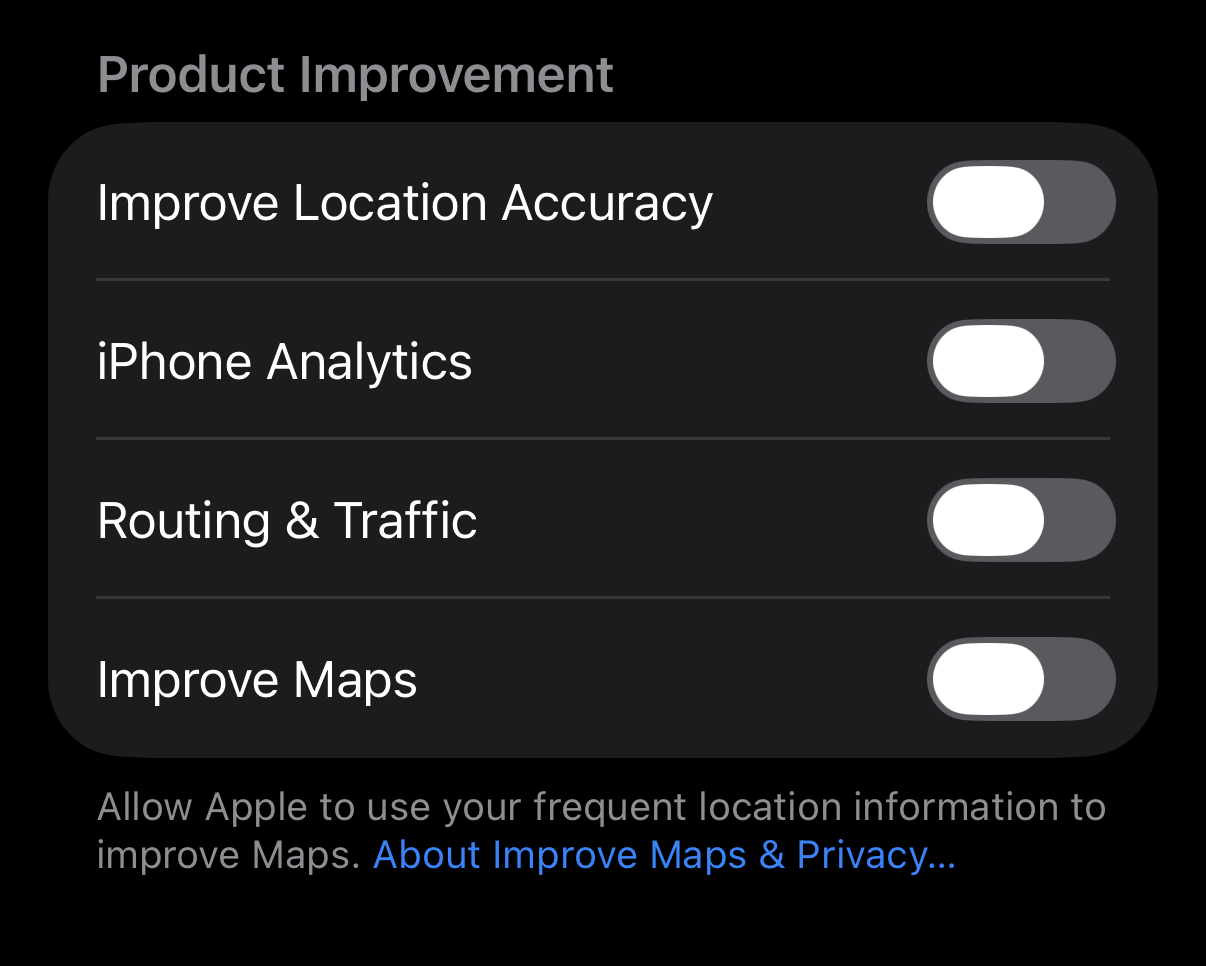
One other setting to disable in Location section - "Product Improvement", no it's not improvement for you it's simply to use your data to improve Apple systems, just disable it. Go to Settings-> Privacy & Security-> Location Services scroll down through all the apps, at the bottom you'll see "System Services", click on it. Scroll down to "Product Improvement" section and disable all settings within that section. #iphoneprivacy #punkprivacy
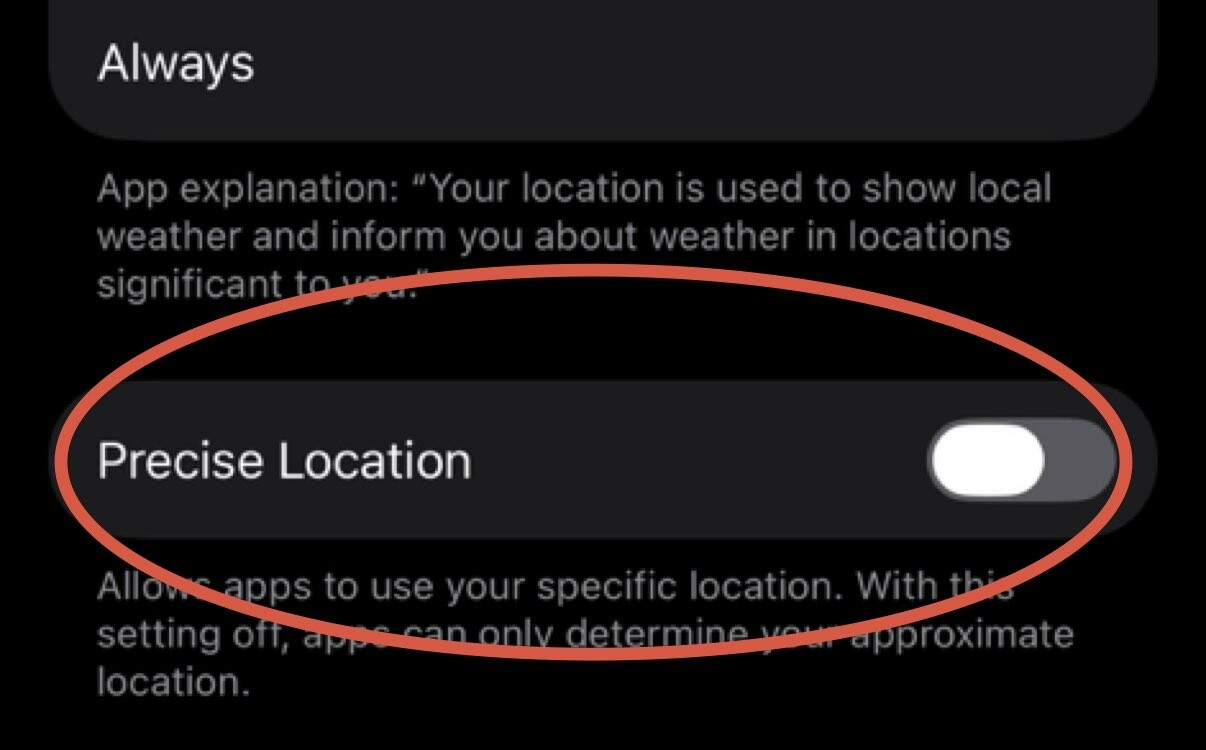
Let's talk about location precision. iPhone has a setting that controls how precise your location passed to an app. Unfortunately by default it's precise, which is a within 10 ft radius. Turning it off makes it a mile-ish radius. I am sorry, but weather does not change within a mile radius, so your weather app does not need it. Go to Settings-> Privacy & Security-> Location Services, review apps and turn off Precise Location unless it's an app that needs it. #iphoneprivacy #punkprivacy
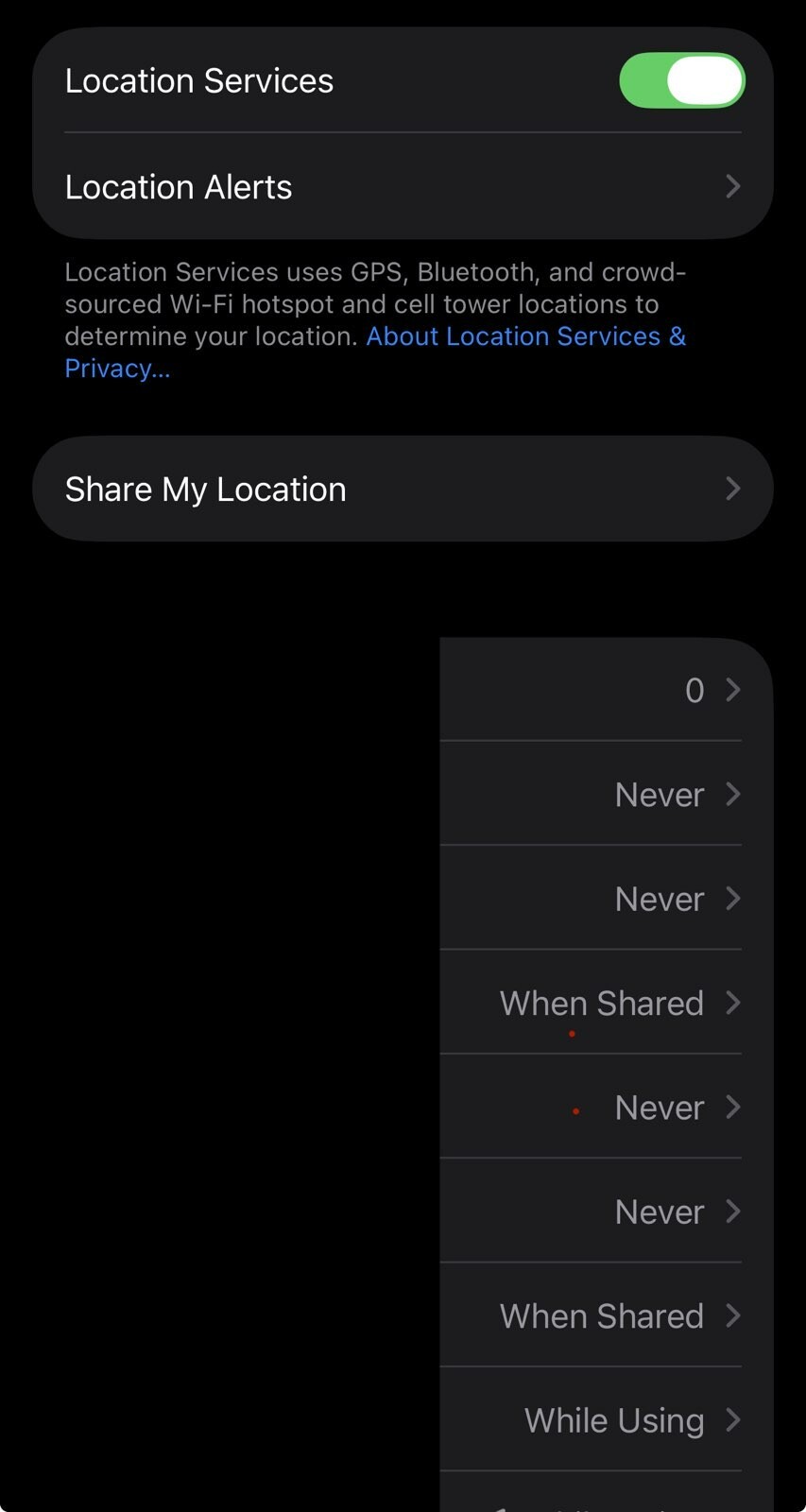
We are not done with location just yet, now we need to review apps that we are sharing location with. Go to Settings-> Privacy & Security-> Location Services and review each app. Typically you night have next options: Never, Ask Next Time or When I Share, While Using the App, Always. Many apps will attempt to convince you to switch to Always, never do that. If app requires location, maps for example, settle on While Using the App.
#iphoneprivacy #punkprivacy
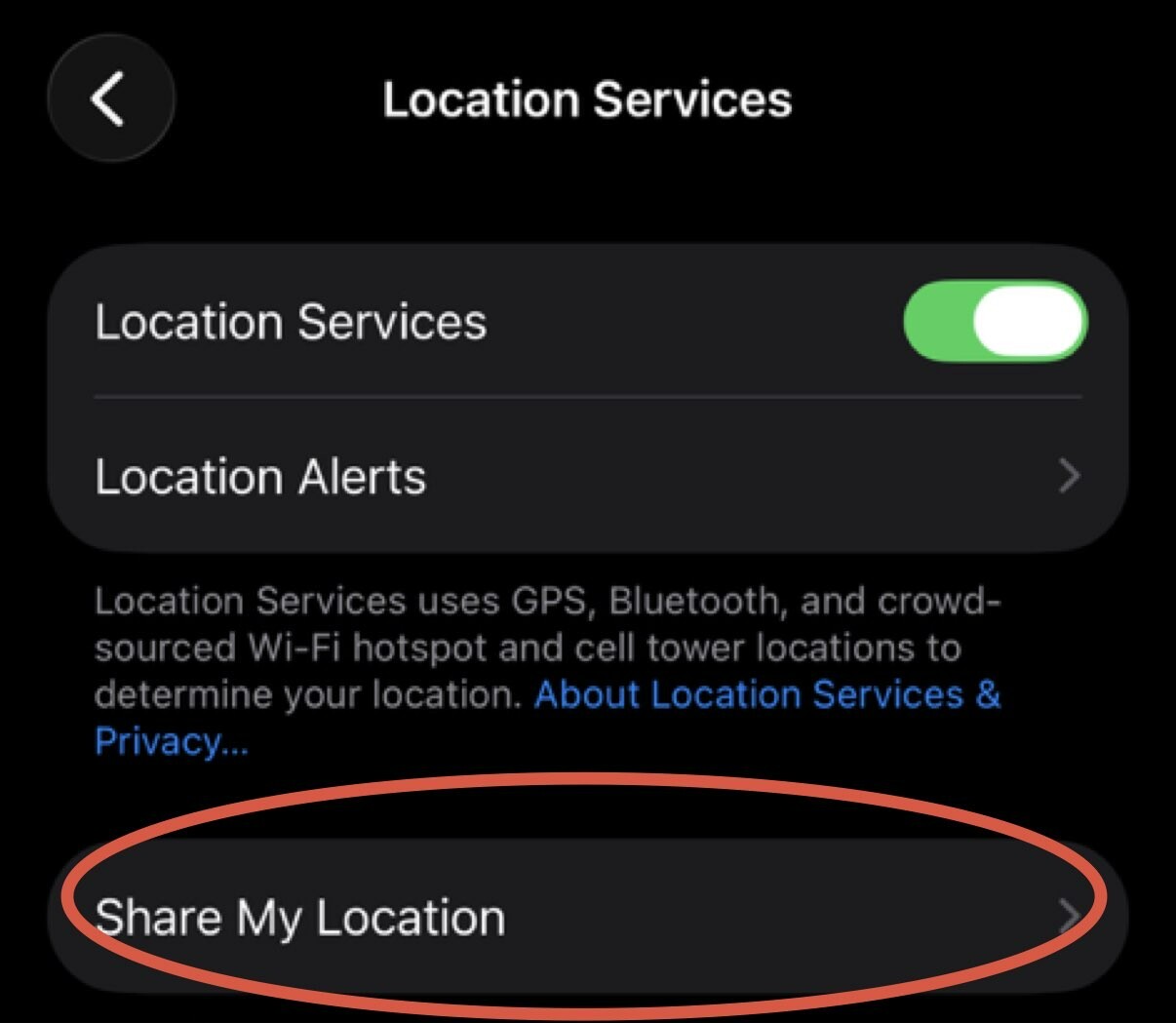
Let's start with iPhone feature to share location with your friends/family. Go to Settings-> Privacy & Security-> Location Services-> Share My Location and confirm that you intended to share it with those people. Click on individual person, scroll down and click "Stop Sharing My Location" to stop. Go through every name on the list. If you are not sharing with anyone click on "Share My Location" green checkbox to stop sharing it all together. #iphoneprivacy #punkprivacy
I have decided to start a series of posts on iPhone privacy with tips, to help people understand privacy settings on their device, learn what those settings do and how to configure them. Series can be found under #iphoneprivacy hashtag.
#punkprivacy
Sergey Shkundaleu
boosted

By me: ClickFix attacks are on the rise. By spoofing Windows crash errors, Cloudflare captcha pages, and Apple logins, all try to trick you into pasting malicious code into your computer.
ClickFix hacks affect Windows and Mac users, can skirt common security defenses, and plant malware in a flash.
In my new blog, I explain how ClickFix attacks work, what to look for (with pictures!), and how to stay safe. I also tested some ClickFix attacks myself.
Please read & share! https://this.weekinsecurity.com/clickfix-attacks-are-increasingly-devious-dangerous-and-can-get-you-hacked-in-an-instant/
I have decided to write a longer post on subject of improving privacy of your phone and how to approach it in general. Here is the link to my blog post: https://sergeysh.com/2025/12/22/Privacy-on-your-phone/
Sergey Shkundaleu
boosted

New from 404 Media: Flock exposed some of its AI-powered cameras to the internet. We know because we tracked ourselves with them. These cameras zoom in on passersby, sometimes so close we could read a random person's phone screen. Required no login to view cameras
https://www.404media.co/flock-exposed-its-ai-powered-cameras-to-the-internet-we-tracked-ourselves/
Android or iOS based phone? Both types that are commercially available are bad for privacy. To minimize number of trackers on Android side stick to Pixels and ignore everything else. On iOS side there is only one. Then depending on how tech savvy you are you can do a lot, goal is simple to make sure no company has a control over your life and you can lose relationship with that company at any moment if they pull the plug.
Deepfakes gaining popularity among scammers, there are stories that nation state sponsored threat actor infiltrated a lot of world wide companies, and they used deep fakes to pass interviews and so on. So it's important to have plan within your own family to ensure that you are not talking to a deepfake. Maybe to resort to a secret word which only your family members would know.
Link:https://www.biometricupdate.com/202512/deepfakes-social-engineering-working-together-to-break-human-judgment
Article, that tells a story that man got locked out of his Apple account by trying to redeem gift card, Apple account apparently has his entire life ... and then conclusion is you need to buy gift cards at a verified location and then appeal if you locked out. However no one talks about digital sovereignty and the fact maybe you don't need to store your data on "somebody else's computer" because that's what cloud is. https://tidbits.com/2025/12/18/compromised-apple-gift-card-saga-ends-well-but-risks-remain/
Interesting development in AI cybersecurity capabilities, new OpenAI model that is aiming to make it easy to discover vulnerabilities. Only time will show how effective it is. Read here: https://cybersecuritynews.com/gpt-5-2-codex/
Legal requirements of age verification by platform in EU and some states in US will only lead to one thing instead of protecting children it will expose adults. Those services or platforms using them will eventually get breached. Here is an example of such failure, 70K of records exposed by Discord. https://discord.com/press-releases/update-on-security-incident-involving-third-party-customer-service
Surveillance is easy, it does not require any special equipment and for little bit of money you can do a lot. Here is article analyzing Le Monde's article that talks about tracking of daily movement of French police and military. What can you do about it? Start deleting advertisement ID, may not help much but it's a good first step. I wrote about that in my mini advent calendar for privacy improvement on punkprivacy.com. Here is article itself: https://proton.me/blog/ad-tech-privacy #punkprivacy
Came across Spam Watch 2025 report by Proton team. Key finding that there is no retailers that were good in respecting privacy and low volume of marketing fluff. Surprisingly there were global retailers respecting privacy and not using any trackers in their emails. Some retailers came close with no trackers and low volume, but then they probably had a team who used different system and once in a while they'll sent an email with lot's of trackers. Report: https://res.cloudinary.com/dbulfrlrz/images/v1765301399/wp-pme/proton-mail-spam-watch-2025--the-u-s--inbox-overload-hidden-tracker-report/proton-mail-spam-watch-2025--the-u-s--inbox-overload-hidden-tracker-report.pdf
Article stating that Meta earning a fortune from fraudulent ads. Ads has no real purpose other than to track you across the internet, those are small beacons of data that you take with you everywhere you go on the Internet. Solid reason to use ad-blockers, especially if particular platform does not care about protecting you from fraudsters and you are better off DIY.
Link: https://www.reuters.com/investigations/meta-is-earning-fortune-deluge-fraudulent-ads-documents-show-2025-11-06/
- WebSite
- https://sergey.iontec.co/
- GitHub
- https://github.com/sergshk
Admin
Experienced technology entrepreneur on the quest for ethics and privacy. Follow #punkprivacy tag to get regular privacy tips. You can also follow @ethiork account to get information about progress of Ethiork project that enables people to own their data and protect their privacy.
Joined Nov 2020